***This document provides helpful tips to improve your site's accessibility. While it doesn’t guarantee 100% compliance, it’s a great starting point to make your website more inclusive and user-friendly.***
Identification
ARIA meter elements must have an accessible name (Rule ID: aria-meter-name)
Applicable Standards
WCAG 2.0, 2.1, 2.2 Level A (1.1.1)
EN 301 549
Deque Best Practice
Impact
Serious level impact affecting:
Blind users
Low vision users
Users with mobility impairments
Proper Implementation
Provide descriptive accessible names for meter elements
Use one of these methods:
aria-label attribute with non-empty value
aria-labelledby referencing an element with visible text
title attribute with descriptive text
Ensure labels are clear and meaningful
Examples of Correct Usage
Using
aria-labelfor an Accessible Name:The
aria-labelprovides a clear and concise accessible name ("Battery level"), describing the purpose of themeterelement.

Using
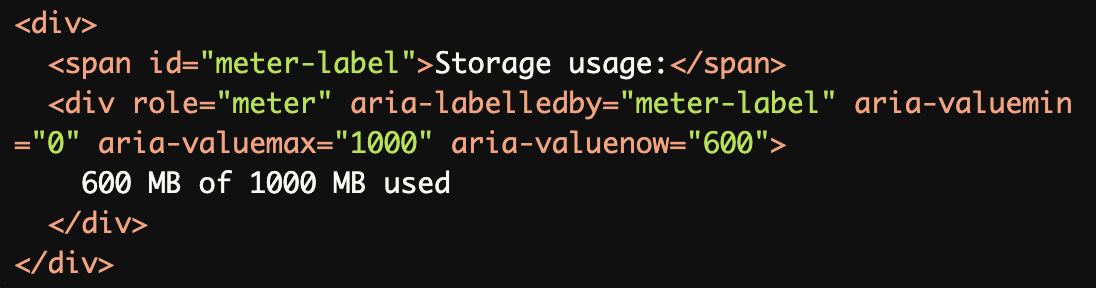
aria-labelledbyto Reference Visible Text:
Thearia-labelledbyattribute references the visible text ("Storage usage:"), providing a meaningful label for themeterelement.
Using the
titleAttribute for a Descriptive Name:
Thetitleattribute provides an accessible name ("CPU usage") for themeterelement. Screen readers announce this information along with its current value.

Including Both Purpose and Value:
Thearia-labelcombines themeterelement's purpose ("Download speed") with its current value ("50 Mbps") for clarity.

Using
aria-valuetextfor Custom Status Descriptions:
Thearia-valuetextprovides a custom status message ("Excellent performance"), which screen readers announce instead of just the numeric value.

Common Errors to Avoid
Missing Accessible Name:
Without anaria-label,aria-labelledby, ortitle, themeterelement lacks an accessible name, leaving screen reader users unaware of its purpose.

Non-Descriptive Name:
Thearia-label("Meter") is too vague and does not explain the purpose of themeterelement, making it unclear to users.

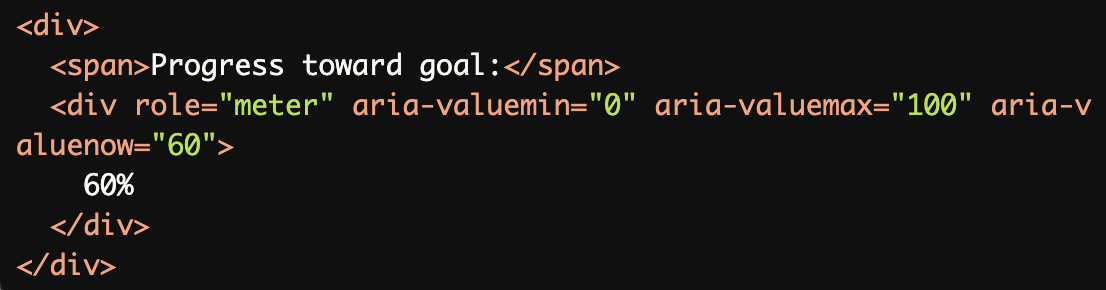
Visible Label Not Associated with the
meterElement:
The visible label ("Progress toward goal:") is not connected to themeterelement viaaria-labelledby, so screen readers cannot associate the label with themeter.
Repeating Numeric Values in
aria-valuetext:The aria-valuetext ("50 Mbps") repeats the numeric value already provided by aria-valuenow, offering no additional information to screen reader users.

Using
role="meter"for Non-Range Values:
Themeterrole is misused for a static status indicator ("Complete"). This role should only be used for elements that convey a range of values.

Rationale
Enables screen reader users to understand meter purpose
Provides context for measurement values
Essential for comprehending meter readings
Ensures proper identification of meter function
Critical for data interpretation
Evaluation Method
Inspect the Code
Check that:
Each
meterelement has a descriptive accessible name viaaria-label,aria-labelledby, ortitle.The purpose and current value of the
meterelement are clearly communicated.aria-valuemin,aria-valuemax, andaria-valuenoware used appropriately.
Test with Assistive Technology
Use a screen reader (e.g., NVDA, JAWS, or VoiceOver) to confirm:
The
meterelement's purpose and current value are announced clearly.Custom status descriptions (
aria-valuetext) are read as intended.
Evaluation Checklist