***This document provides helpful tips to improve your site's accessibility. While it doesn’t guarantee 100% compliance, it’s a great starting point to make your website more inclusive and user-friendly.***
Identification
All <video> elements must have proper captions (Rule ID: video-caption)
Applicable Standards
WCAG 2.0, 2.1, 2.2 Level A (1.2.2)
Section 508 (1194.22)
Trusted Tester (17.A)
EN 301 549
Impact
Critical level impact affecting:
Deaf users
Hard of hearing users
Proper Implementation
Include
<track>element withkind="captions"Provide accurate captions for all audio content
Include speaker identification
Caption all meaningful sound effects
Include musical cues and background sounds
Support multiple languages when needed
Examples of Correct Usage
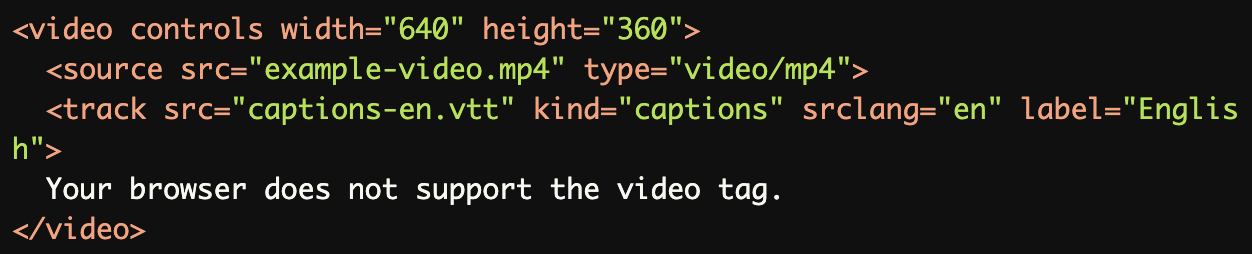
Basic Video with Captions:
This example uses the correct<track>element withkind="captions", ensuring accessible captions for the video content.
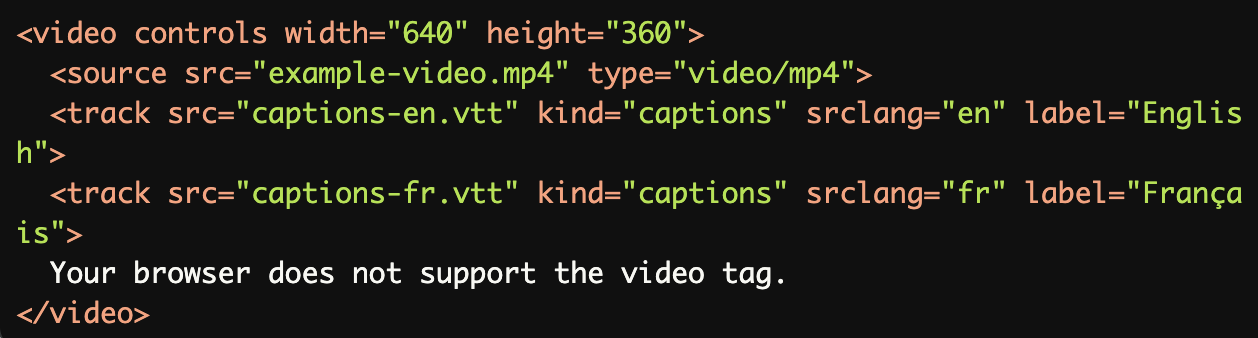
Captions in Multiple Languages:
This example includes captions in multiple languages, allowing users to select their preferred language for accessibility.
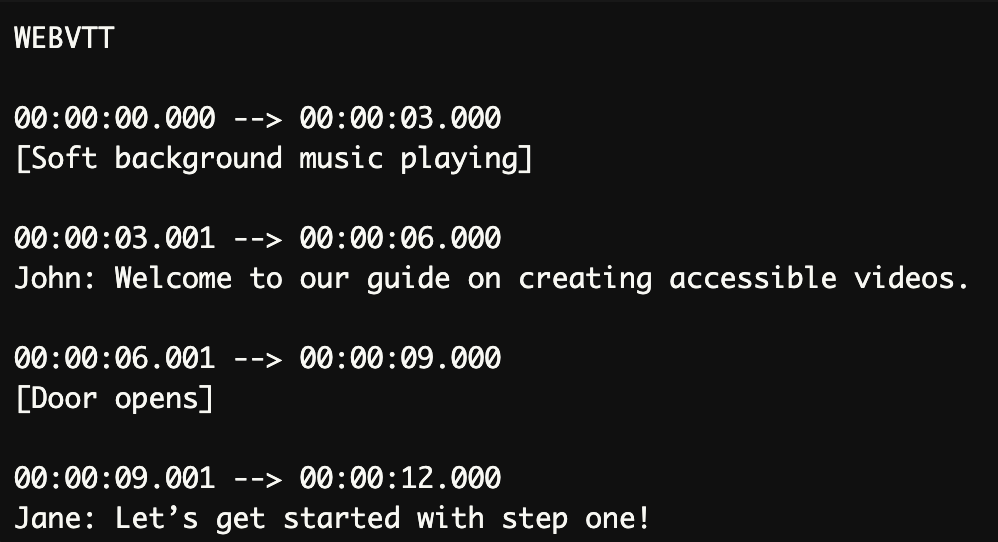
Detailed Captions with Speaker Identification:
The captions file includes speaker identification, background music descriptions, and sound effects, making it fully accessible.
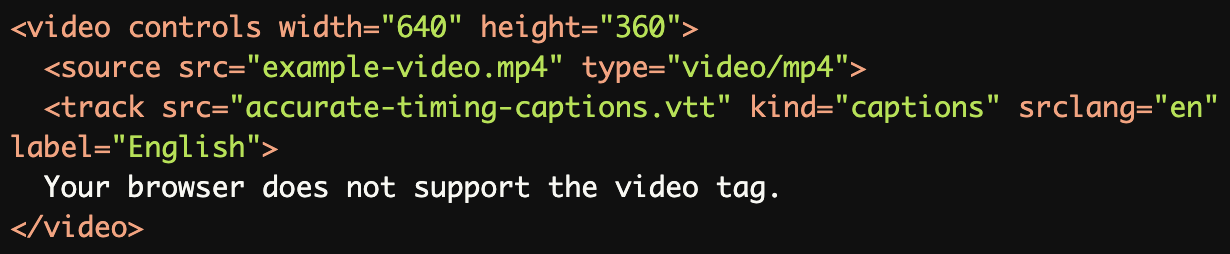
Accurate Timeline Synchronization:
This example ensures that captions are synchronized with the video timeline for a seamless viewing experience.
Common Errors to Avoid
Missing
<track>Element:This example fails to include a
<track>element, making the video inaccessible to deaf or hard-of-hearing users.

Incorrect <
kind>Attribute
Thekind="subtitles"attribute is incorrectly used instead ofkind="captions". Subtitles don't include essential audio cues, which are necessary for accessibility.

Incomplete Captions:
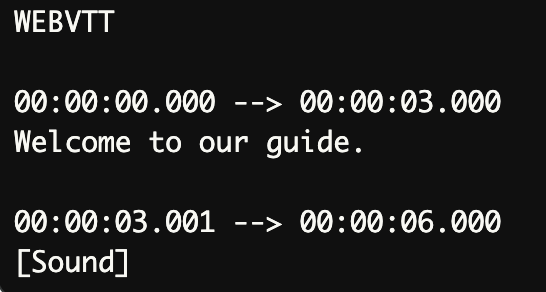
Captions are incomplete as they lack speaker identification, meaningful sound descriptions, and detailed audio cues.
Missing Fallback Message
This example fails to include a fallback message for browsers that don’t support the<video>element, reducing accessibility.

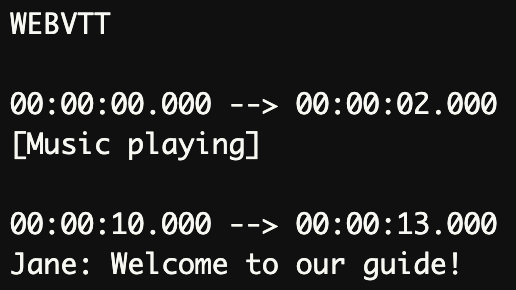
Unsynchronized Captions
The captions are not synchronized with the video timeline, leading to a poor user experience for viewers relying on captions.
Rationale
Essential for deaf users to access audio content
Provides context for sound effects and music
Enables understanding of speaker identification
Necessary for comprehending emotional tone
Critical for educational and informational content
Evaluation Method:
Check for the Presence of Captions:
Ensure that the
<video>element includes a<track>element with thekind="captions"attribute.Verify that the captions file is correctly linked via the
srcattribute of the<track>element.Inspect the video element in the HTML (e.g., using browser developer tools).
If the
<track>element is missing or incorrectly configured, the video fails accessibility evaluation.
Verify Caption Content:
Evaluate the captions file (e.g.,
.vtt) to ensure it meets the following criteria:Accurate Dialogue: Captions must match the spoken dialogue exactly.
Speaker Identification: Identify speakers when it's not clear who is speaking.
Non-Dialogue Audio: Include descriptions of meaningful sounds (e.g., "[door slams]" or "[upbeat music playing]") that provide context to the content.
Musical Cues: Describe background music or audio cues that add meaning.
How to Check:
Open the captions file (e.g.,
captions-en.vtt) in a text editor.Look for: Synchronization with the video timeline, Clear and accurate transcription of dialogue, Meaningful descriptions of non-verbal sounds.
Test Timeline Synchronization
Captions must appear at the correct time and align with the video’s audio.
Delays or early captions reduce usability and fail to meet accessibility requirements.
To check, play the video with captions enabled and observe the timing:
Does each caption appear and disappear at the right moment?
Do captions match the spoken dialogue and audio cues?
Check for Completeness
Ensure captions cover the entire video, from start to finish.
Captions should include:
All spoken dialogue.
Relevant sound effects.
Background music.
How to Check:
Watch the video with captions enabled.
Confirm that no dialogue or meaningful sound is missing from the captions.
Evaluate Multi-Language Support (if applicable)
If the video is intended for a multilingual audience, check that captions are available in all required languages.
Verify that each <track> element corresponds to a properly translated captions file.
How to Check:
Look for multiple
<track>elements in the HTML, each with a uniquesrclangattribute:Test the video in a player that allows language selection and confirm the captions match the audio content in each language.
Ensure Browser Compatibility
Verify that the video and captions work across all major browsers (e.g., Chrome, Firefox, Safari, Edge) and devices (desktop, mobile).
How to Check:
Test the video on different browsers and devices.
Confirm that captions display correctly and are easy to toggle on/off.
Provide a Fallback for Unsupported Browsers
Include a fallback message in the <video> element for browsers that do not support HTML5 video:
How to Check:
Disable video playback support (e.g., using browser developer tools or testing in an outdated browser).
Confirm that the fallback message is displayed.
Evaluate User Experience
Ensure captions are legible and enhance the viewing experience:
Use a readable font size.
Avoid overlapping captions with critical on-screen content.
Ensure captions contrast well with the background.
How to Check:
Play the video and observe the captions' visibility.
Test the captions in various lighting conditions (e.g., dark mode or bright environments).



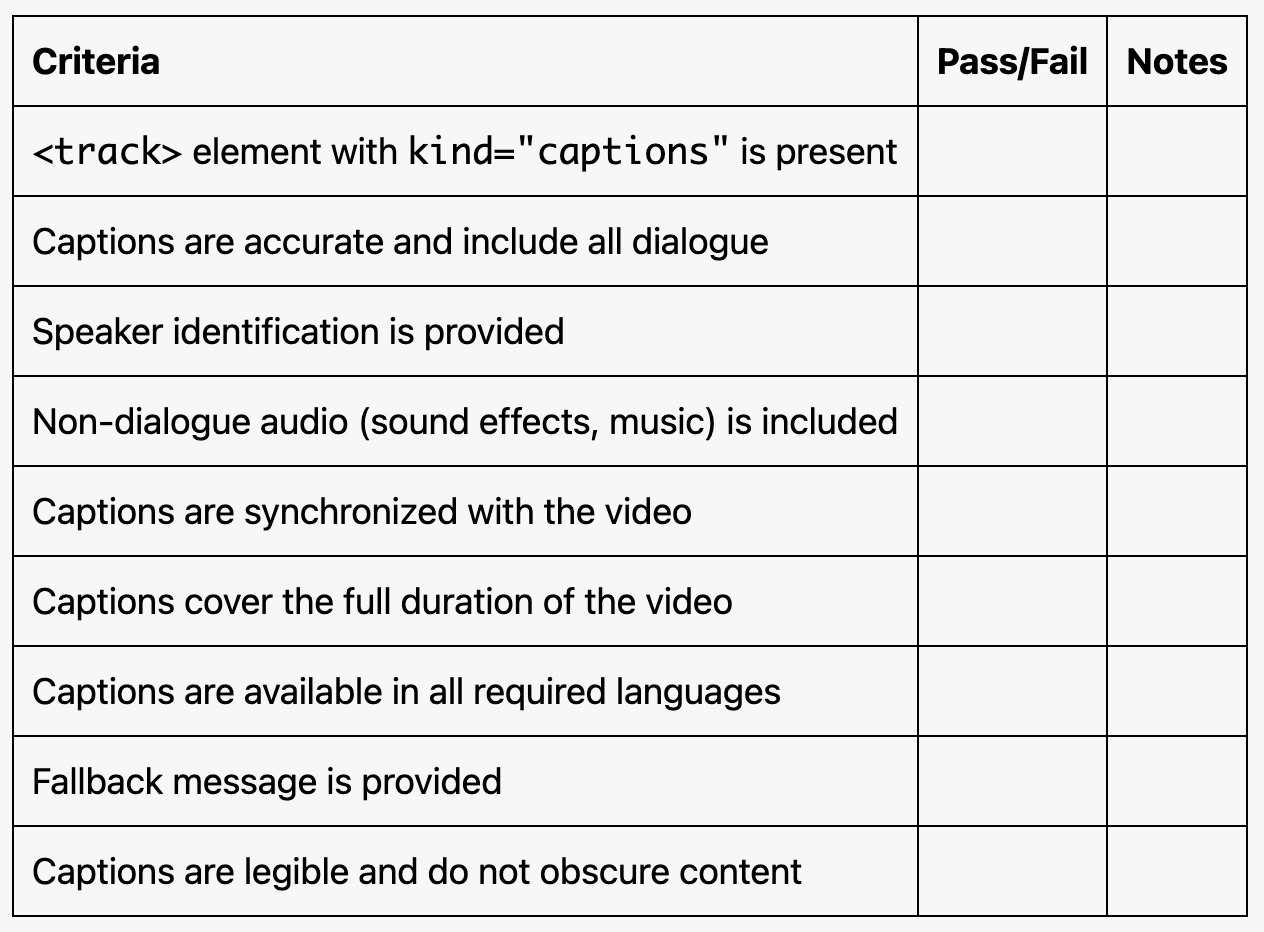
Evaluation Checklist