***This document provides helpful tips to improve your site's accessibility. While it doesn’t guarantee 100% compliance, it’s a great starting point to make your website more inclusive and user-friendly.***
Identification
Frames must have an accessible name through title attributes (Rule ID: frame-title)
Applicable Standards
WCAG 2.0, 2.1, 2.2 Level A (4.1.2)
Section 508 (1194.22)
Trusted Tester Guidelines
EN 301 549 (9.4.1.2)
Impact
Serious level impact affecting:
Blind users
Deafblind users
Users with mobility impairments
Proper Implementation
Provide descriptive title attributes for all frame/iframe elements
Make titles unique across the page
Ensure titles are brief but informative
Match frame title with the embedded document's title element
Place unique information at the beginning of titles
Align titles with main headings where appropriate
Examples of Correct Usage
Descriptive Title Explaining Purpose:
Thetitleattribute clearly describes the purpose of the iframe, helping screen reader users understand its content.

Title Matching the Embedded Document:
Thetitleattribute matches or complements the title of the embedded document, ensuring consistency and clarity.

Unique Titles Across Multiple Frames:
Each iframe has a unique title, preventing confusion for screen reader users navigating multiple frames.

Brief But Informative Title:
The title is short and descriptive, allowing users to quickly understand the iframe's purpose without unnecessary details.

Aligning Title with Main Heading:
The iframe title aligns with the main heading ("Frequently Asked Questions"), ensuring consistency with the page's structure.

Common Errors to Avoid
Missing
titleAttribute:
The missingtitleattribute leaves screen reader users with no context about the iframe's purpose or content.

Generic or Vague Title:
A generic title like "Frame" does not provide meaningful information, making it harder for users to understand the iframe's purpose.

Duplicate Titles for Multiple Frames:
Duplicate titles ("Content Section") create confusion for screen reader users when navigating multiple frames.

Overly Long or Complex Title:
The title is unnecessarily long, making it cumbersome for screen reader users to understand quickly.

Title Does Not Reflect Content:
The title inaccurately describes the iframe content, leading to confusion for screen reader users.

Rationale
Screen reader users rely on frame titles to understand frame content
Titles enable quick navigation between multiple frames
Without titles, screen readers may resort to reading:
Generic "frame" text
JavaScript code
Filenames
URLs
Proper titles improve navigation efficiency and user orientation
Evaluation Method
Inspect the Code
Verify that all
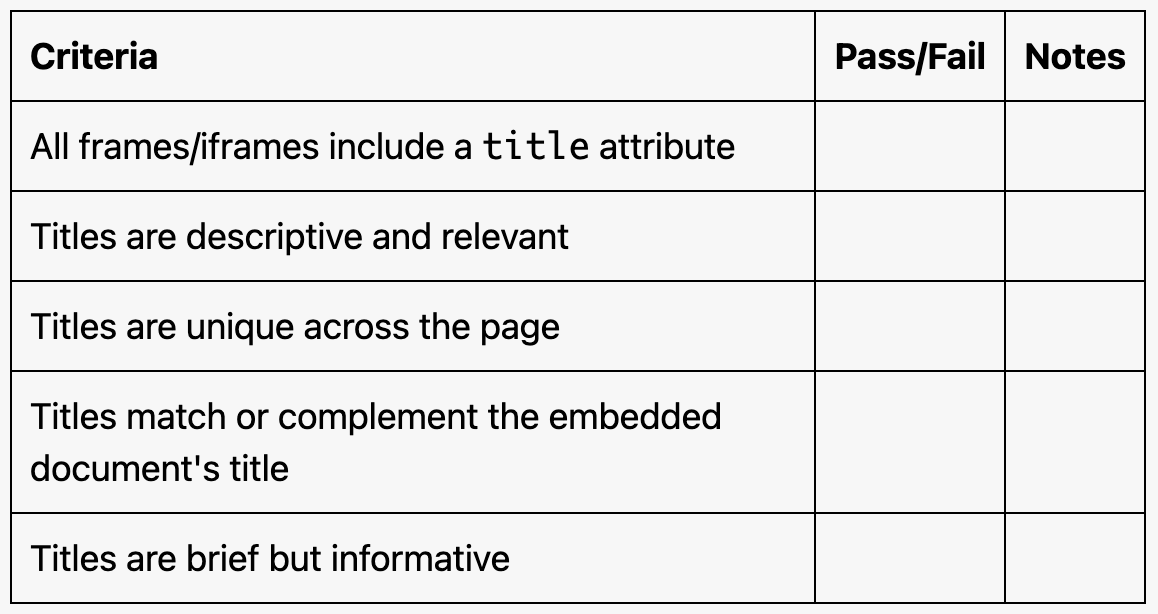
<iframe>and<frame>elements include atitleattribute.Ensure the title is:
Descriptive and relevant to the iframe's content.
Unique across the page.
Brief but meaningful.
Test with Assistive Technology
Use a screen reader (e.g., NVDA, JAWS, or VoiceOver) to navigate the page and confirm that frame titles are announced clearly and provide accurate context.
Evaluation Checklist