***This document provides helpful tips to improve your site's accessibility. While it doesn’t guarantee 100% compliance, it’s a great starting point to make your website more inclusive and user-friendly.***
Identification
IDs used in ARIA attributes and label references must be unique (Rule ID: duplicate-id-aria)
Applicable Standards
WCAG 2.0, 2.1, 2.2 Level A (4.1.2)
EN 301 549 (9.4.1.2)
Impact
Critical level impact affecting:
Blind users
Deafblind users
Proper Implementation
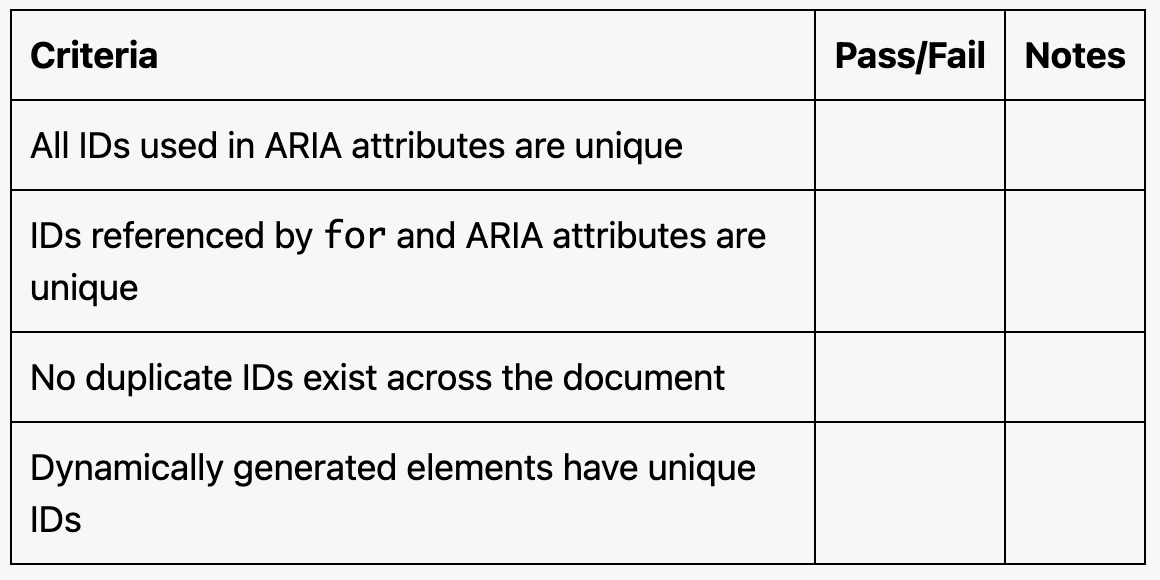
Each ID used in ARIA attributes must be unique
IDs referenced in label 'for' attributes must be unique
Ensure no duplicate IDs exist across the document
Use descriptive and meaningful unique identifiers
Examples of Correct Usage
Unique IDs for ARIA Attributes:
Thearia-describedbyattribute references a unique ID (menu-help), ensuring proper association with the tooltip.

Unique IDs in aria-labelledby:
Thearia-labelledbyattribute references a unique ID (section-title), providing an accessible heading for the section.

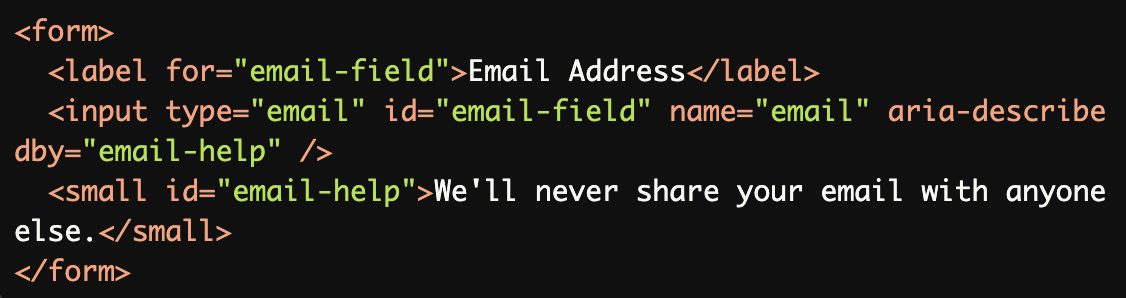
Unique IDs for Input Labels:
Each ID (email-fieldandemail-help) is unique, ensuring proper association for bothforandaria-describedbyattributes.
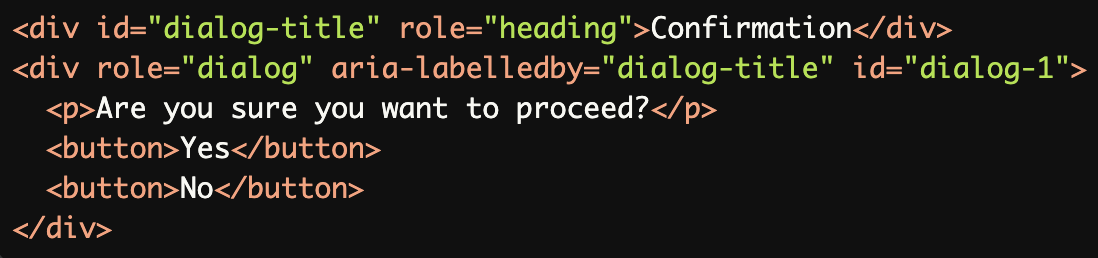
Unique IDs for Dynamic Content:
Unique IDs (dialog-titleanddialog-1) ensure the dialog and its title are properly associated without conflicts.
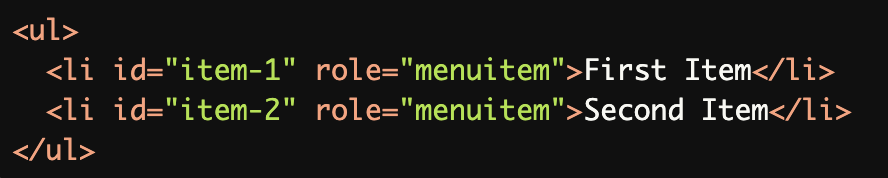
Dynamic Generation with Unique IDs:
Dynamically generated items use unique IDs (item-1,item-2), ensuring assistive technologies function correctly.
Common Errors to Avoid
Duplicate IDs for ARIA Attributes:
The same ID (tooltip) is used for multiple elements, causing confusion for screen readers as they cannot distinguish between the buttons.

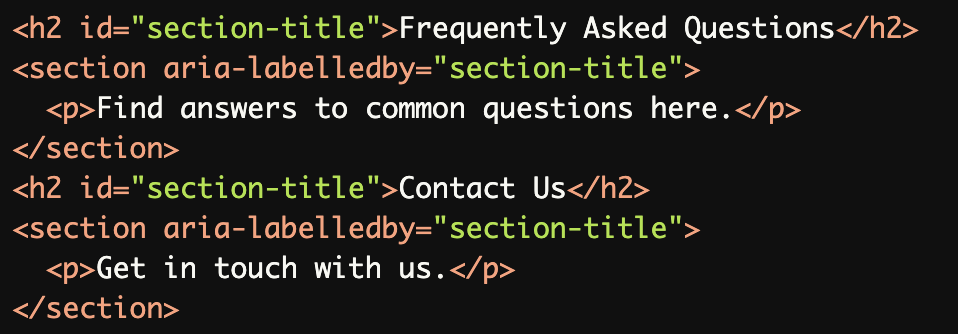
Duplicate IDs in
aria-labelledby:The duplicate ID (section-title) causes assistive technologies to associate both sections with the same heading, leading to confusion.
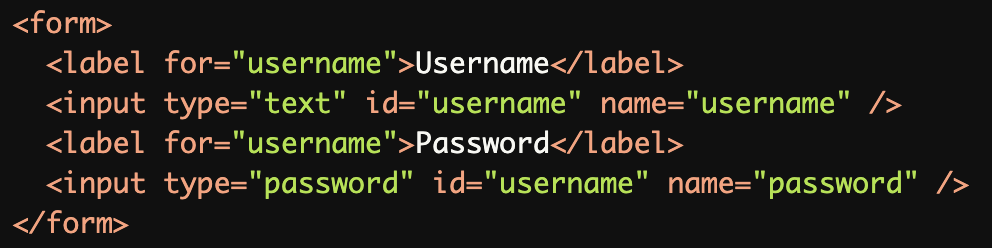
Reusing IDs for Input Labels:
The same ID (username) is used for both input fields, breaking the relationship between labels and inputs.
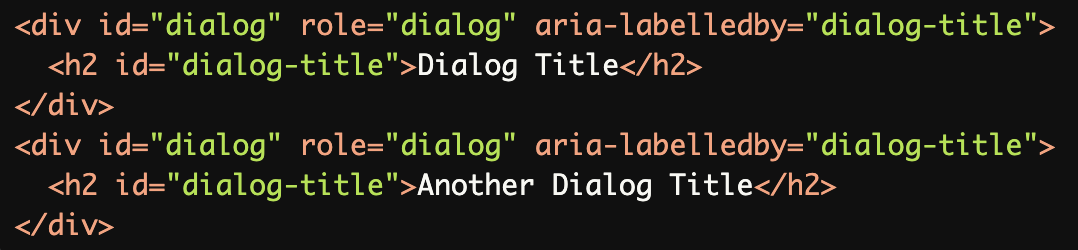
Duplicate IDs in Dynamic Content:
Duplicate IDs (dialoganddialog-title) in dynamic content make it impossible for screen readers to correctly identify and announce the dialogs or their titles.
Non-Unique IDs in Lists:
Reusing the same ID (menu-item) for multiple list items causes assistive technologies to misinterpret the list structure.

Rationale
Ensures proper functionality of ARIA relationships
Maintains accurate form control associations
Enables correct assistive technology interpretation
Prevents scripting conflicts
Ensures reliable reference targeting
Evaluation Method
Inspect the Code
Verify that all IDs referenced in ARIA attributes (
aria-labelledby,aria-describedby, etc.) are unique across the page.Check for duplicate IDs, especially in dynamic or large-scale forms and lists.
Test with Assistive Technology
Use a screen reader (e.g., NVDA, JAWS, or VoiceOver) to confirm:
ARIA attributes are correctly announced.
There are no conflicts or misinterpretations caused by duplicate IDs.
Evaluation Checklist