

***This document provides helpful tips to improve your site's accessibility. While it doesn’t guarantee 100% compliance, it’s a great starting point to make your website more inclusive and user-friendly.***
Identification:
Rule ID: link-name
Part of: axe-core 4.10
Severity: Serious
Applicable Standards:
WCAG 2.0, 2.1, 2.2 (Level A)
Section 508
Trusted Tester
EN 301 549
Impact:
Affects users who are blind, deafblind, or have mobility impairments
Crucial for keyboard-only users and those using screen readers
Proper Implementation:
Ensure all link names are accessible to screen readers
Make links programmatically focusable
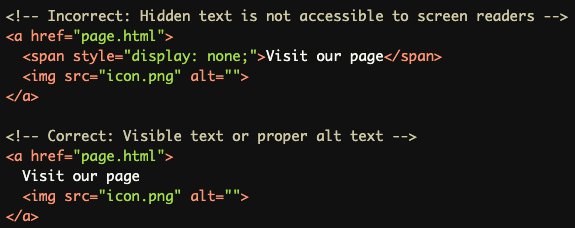
Avoid hiding link text from assistive technologies
Use device-independent events (e.g., onfocus(), onblur())
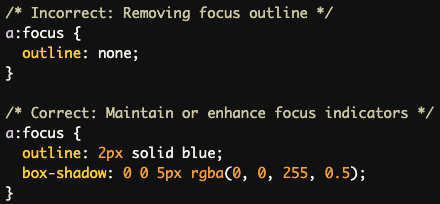
Maintain visual focus indicators for keyboard users
Use proper HTML elements (<a> with href attribute) for links
Examples of Correct Usage:
Using visible text within link tags:

Using aria-label for additional context:

Using images with alt text as links:

Using aria-labelledby to reference existing text:

Common Errors to Avoid:
Using device-specific events (e.g., onmouseover(), hover())

Hiding link text with CSS (display: none) or ARIA (aria-hidden="true")
Creating non-focusable links

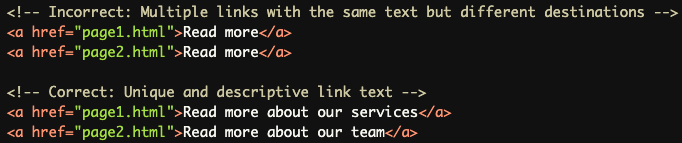
Using duplicate link labels
Removing focus indicators through CSS
Rationale:
Links are fundamental to web navigation
Clear link purposes aid comprehension for all users
Focusable links ensure keyboard accessibility
Proper implementation supports various assistive technologies
Evaluation Method:
Automated checks ensure every link has an accessible name
Verifies links are focusable
Checks for duplicate link labels
May require manual review for context-dependent link purposes
By adhering to these guidelines, developers can create links that are accessible and usable for all users, regardless of their abilities or the technologies they use to navigate the web.